First Impressions: Meta Ray-Ban Display

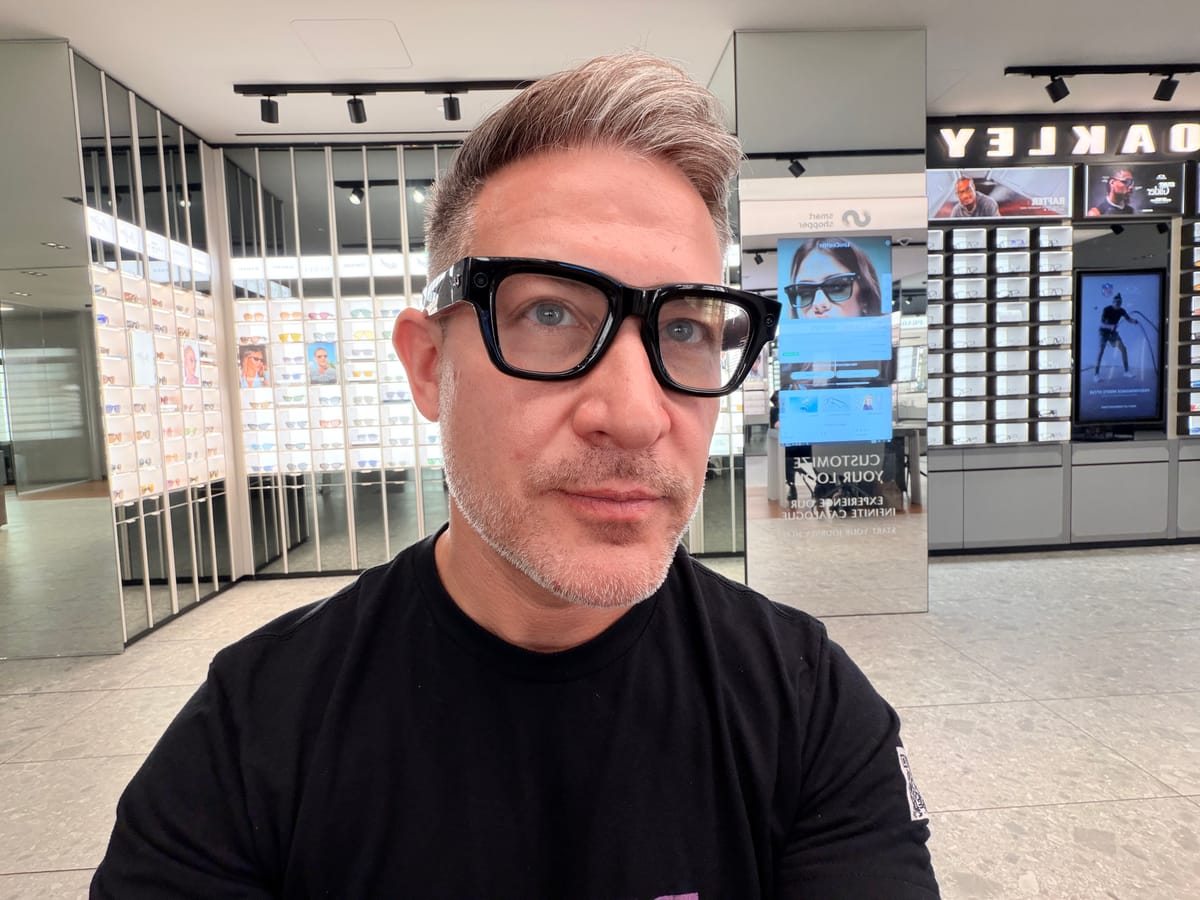
Before you read this review, you have to know that I am a huge fan of glasses.
I've worn glasses since I was a kid and can't remember a time when I haven't woke up needing to reach for a pair. Glasses for me are not an accessory. They are a necessity for me to function every day.
Beyond enhancing my physical sight, I am also a huge fan of glasses because of their potential to be the form factor of the next wave of computing. I was an early adopter of Google Glass, having worn the device for over a year on the streets of Toronto, including a pair that attached to prescription glasses. I followed my time with Glass with Focals by North, which I bought at their store in Brooklyn, NYC.

Meta announced its first pair of AI glasses with a display recently at Connect 2025. The Meta Ray-Ban Display is now officially on sale to the public. I just left my LensCrafters appointment, where the Meta Ray-Ban display is open for anyone to try, and wanted to share my first impressions. I do this hesitantly because I believe that a fair review of any consumer device requires at least a couple of weeks of regular use to form real conclusions. But as I won't be buying a pair, my initial thoughts will have to do.
Frames
My first reaction to Meta Ray-Ban Display was that the glasses themselves are huge.
There are two sizes of frames: standard, which is 140mm, and large, which is 150mm, both measured hinge to hinge. I’ve always liked bold, oversized glasses and have been told I can pull them off, but I was still surprised by how big these felt, especially when compared to the Ray-Ban Meta frames. You can see in the picture below that even the standard size glasses cover my entire eyebrows. I imagine they could feel a bit overwhelming for anyone used to narrower or more traditional frames
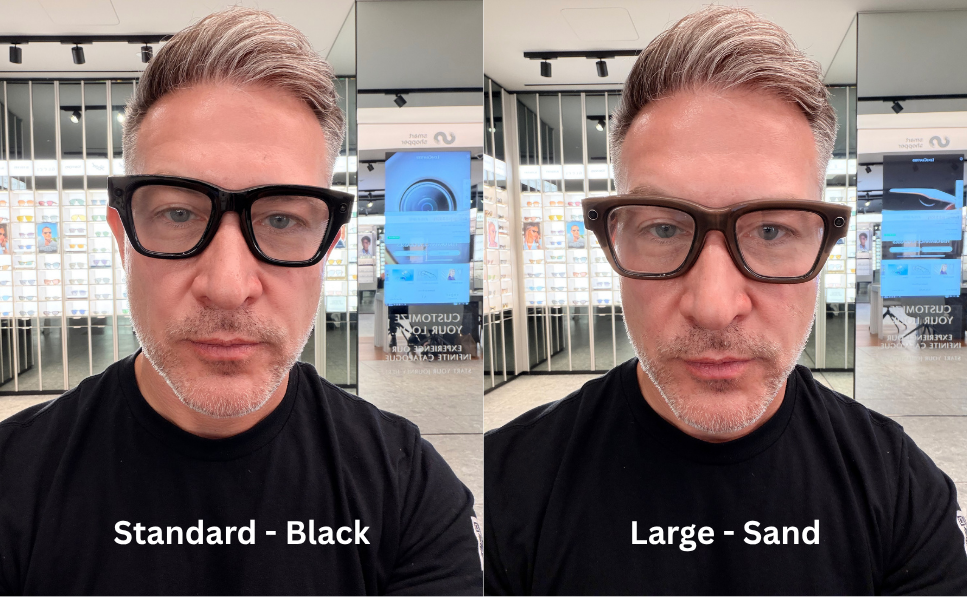
To put the Meta Ray-Ban Display frames in perspective, most eyeglass frames fall between roughly 130 and 145 mm hinge to hinge, depending on style and fit. Men’s frames often land toward the higher end of that range, while women’s tend to be slightly narrower. That means the Display sits near the top end, if not just above, what many people wear. For that reason, I think the Display works better as a pair of sunglasses than as everyday glasses, since most people are comfortable with larger frames in that context.
Putting the size aside, the glasses themselves are stylish, thanks to Meta's lucrative partnership with EssilorLuxottica. The Ray-Ban Wayfarer style is iconic. The glasses come in black and sand, both classic color choices for glasses that are sure to resonate with a variety of wearers. I actually liked both, but gravitated towards the black frames as they felt more like a statement piece. If they were going to be big, they might as well be bold.
I only had about 45 minutes with the device, and with this limited exposure, I can say that the glasses themselves felt comfortable on my face. I didn't personally notice any heaviness or discomfort on my ears or nose while wearing them for that short period of time. I would be curious if that would change with longer-term use. The standard Meta Ray-Ban glasses weigh 69g, placing them on the upper end of everyday eyeglasses (heavy frames typically weigh 40-50g+). They are also nearly ~35% heavier than the Ray-Ban Meta Wayfarer (Gen 2), which weighs 51g.
Lenses
The Meta Ray-Ban Display works by using a tiny projector in the right temple to beam an image into a waveguide inside the right lens. The waveguide directs the light toward the wearer’s eye, creating a small floating image that only they can see. In most cases, you aren't able to see the screen when you are looking at someone wearing them. And you could blink and miss the etches on the right lens that are a tell that this pair of glasses is different than a regular pair.
Like Ray-Ban Meta, the Display version comes with transition lenses that let you wear them inside and out. I wasn't able to test these outdoors, but I will say that I got a second pair of Ray-Ban Meta to have transition lenses because the glasses are useful everywhere you go. That being said, I find that in direct sunlight, the transition lenses don't get as dark as I would want them to be to help me see better outside.
One of the big things to note for people like me who need glasses to see is that the Meta Ray-Ban Display currently supports very limited prescriptions. At this time, single-vision prescription lenses with a range of -4.00 to +4.00 total power are supported. While my prescription fell within the range, the single-vision constraint was a no-go for me as I wear progressive lenses and am not willing to go back to having to take off glasses to see something up close. The store rep did mention that many users are opting to wear contacts with the glasses, which is a solid workaround and similar to what I do with the Ray-Ban Meta AI glasses.
Neural Band
The Meta Ray-Band Display comes with an EMG wristband called the Meta Neural Band. EMG stands for electromyography, which is the process of measuring electrical activity in muscles. You use this wristband to control the interface on the glasses. It is quite novel and something we haven't really seen rolled out commercially to consumers, especially bundled with smartglasses.
Just like the Display frames, the Neural Band comes in various sizes and in two colors that match the glasses. The Band feels as wide as a watch band, wraps around like one of Apple's magnetic loop options, and is adjustable. It sits relatively flat on your wrist, except for a small raised area at the top where the processing unit is located. The band is made of a high-performing textile that gave me Daydream VR vibes, as it looked strong yet organic. Meta says that the band features an IPX7 water resistance which should protect it while doing things like the dishes or washing your hands.
One of the main reasons you need to visit a store to purchase the Meta Ray-Ban Display is to get fitted for your Neural Band. Meta states on its website that it is "critical that the sensors are placed correctly and can pick up the muscle signals in your wrist." The representative at LensCrafters used a measuring band placed just below my wrist bone to determine which size, 1, 2, or 3, would best fit my dominant arm. I measured as a size 2.
It took a bit of time to get the band on my wrist, even with help from the rep. It slid on easily, but tightening it was a little awkward. The rep mentioned that many people find it tricky, which made me feel better since I was fumbling with it a bit. Once secured, it felt comfortable enough that I forgot I was wearing it until the rep reminded me to take it off at the end of the demo. Removing it was just as awkward as putting it on, though it seems like the kind of thing you’d get used to, like fastening a new watch.
One of the reasons I didn’t buy the Meta Ray-Ban Display was the Neural Band. I just can’t see myself wearing it on my wrist every day. While the design is solid for a wearable, it doesn’t feel particularly fashionable. On my non-dominant wrist, where I usually wear a few Cartier bracelets, the Neural Band looked noticeably out of place. The good news is that because it sits lower on the wrist, you could easily hide it under a long-sleeved shirt or jacket.
My main hesitation with the Neural Band is whether I’d remember to wear it consistently. It’s one more device to charge, which means there’s a good chance I’d forget it on the charger, or worse, forget to charge it at all and have to leave it behind. I say this based on my experience with the Oura Ring, which I couldn’t stick with for the same reason, and the painful behavior training it took to make my Apple Watch a daily habit.
Charging
Speaking of charging, one of the most exciting moments during my demo was not about the glasses or the band but about the new charging case. The rep showed me how the case can quickly and easily collapse onto itself to be relatively flat. This was very novel, especially as it is a charging case, and will definitely make it easier to carry around in a purse or bag.
According to Meta, the Meta Ray-Ban Display glasses deliver up to six hours of mixed-use battery life on a single charge, with the collapsible charging case extending that to around 30 hours total. From my experience with the original Ray-Ban Meta AI glasses (Gen 1), I often drained the battery over the course of a day. To be fair, that model was rated for about four hours of mixed use.
If these double as your prescription glasses, needing to dock them in the case for even 20 minutes during the day could be inconvenient. The upside is that they still function like any regular pair of glasses or sunglasses, even when the battery runs out.
Gestures
Much of my time at the demo was spent on learning a new set of gestures needed to control the device using the Neural Band.
There were a number of finger and thumb combinations to remember, including tapping your thumb to your middle finger to show/hide the display and tapping your thumb to your index finger to make a selection. These gestures were relatively intuitive, and once I was taught them, they felt very natural and worked pretty much every time. The only gesture that tricked me up was the joystick-like movement you made with your thumb on the side of your index finger, moving it left and right or up and down to navigate. This was intuitive, but didn't work all the time. The rep told me that over time, you figure out the sweetspot of where to place your thumb to make this more reliable.
Perhaps my least favorite gesture I learned was the volume gesture, which required you to twist your hand like turning a knob on a radio. It was cute but felt overworked, and I personally would have preferred using just a thumb-to-index-finger gesture, which would be less conspicuous in a public setting.
My gesture experience reminded me of my first time with Apple Vision Pro. Both were extremely magical moments, which show how the future of interaction will feel like the computer is reading our minds. Apple Vision Pro achieves this through its eye-tracking, while Meta Ray-Band Display uses EMG. This is definitely a much better experience than raising your hand to swipe and tap on the side of your glasses or even using voice in many cases.
As magical and intuitive as the gestures were, I couldn’t help but think back to the ring controller that came with Focals by North. The ring, called Loop, had a small joystick and button for navigating content. What I loved about it wasn’t just the tactile feedback but also how private the interactions felt. Controlling Focals was discreet. The movements were minimal and isolated to the finger wearing the ring. That’s quite different from the Neural Band, which requires more pronounced finger and hand gestures.
That said, the ring form factor has clear limitations, while the Neural Band could evolve to support a much wider range of controls, especially once developers get access to an SDK. Of course, that could be both a blessing and a curse. Too many commands might leave users feeling more frustrated than empowered.
Display
The Meta Ray-Band Display features a monocular display on the right side of the device. The resolution is 600x600 pixels at 42 pixels per degree with a 20-degree field of view. Both the resolution and field of view are pretty impressive, and it feels like a color smartwatch screen floating in the air in front of you. The visuals sit a little lower in your right eye, allowing you to glance down at the display when it is on, while still enabling you to look up and see the world around you without obstruction.
The first thing I noticed about the display was how bright it was. Meta says the display has up to 5000 nits. I was inside the LensCrafters store, which is a pretty bright location, when I did my demo. While trying the glasses on right out of the box, I found the display way too bright for me. Once I turned the brightness down about 50% in the settings, I was able to enjoy the display a lot better. I wasn’t able to test the glasses outdoors, so I’m curious how the display brightness holds up in different lighting conditions and how it feels once the transition lenses darken in sunlight.
Overall, I was pretty impressed with the display. Everything I saw on the screen was sharp and easy to read. There's a natural level of transparency, which makes sense since you still need to see the real world around you. Text from captions and live translations were quick to read, and the map was easy to comprehend. But where the color screen really stood out for me was when I was using the camera app. The live video feed in the camera app viewfinder didn't seem grainy and was decent quality, even when zoomed. It was definitely good enough to help you frame a picture or video.
I have to admit, I’ve always struggled with monocular displays. They ask your eyes and brain to do a kind of mental gymnastics, processing information through one eye while the other stays focused on the real world. After about 45 minutes with the device, my right eye started to feel tired, and I was ready to take the glasses off. I had a similar experience with Focals by North and Google Glass.
If the Meta Ray-Ban Display is like my experience with past monocular displays, I would expect this to adjust over time and build a sort of muscle for it with regular use. Still, it highlights one of the inherent trade-offs of a monocular display in that they are meant to be glanceable, not something you stare at for extended periods to watch video or play games. With the visuals sitting slightly lower in your right eye and an auto-sleep feature, it’s clear Meta designed it for short bursts of interaction, so wearing it continuously for 45 minutes, as I did during my demo, is probably not the intended use.
Apps
Meta Ray-Ban Display offers very similar capabilities to its non-display sibling. You can take a picture or video, send a message via WhatsApp or Messenger, ask questions from Meta AI, and listen to music or take a call. The big change with Meta Ray-Ban Display is that these apps now have a visual component.
The camera now has a viewfinder that lets you see what you are about to capture, making the upgrade to a 12MP camera with 3X zoom worthwhile. Messaging apps let you read your messages, which can be faster than listening to them read aloud. And the Music app allows you to view your cover art and more easily navigate to the songs you want to listen to in your playlist.
The standout apps for me were Captions and Live Translation. Both work by directly targeting what someone is saying in front of you, made possible by the device's multi-array microphones, and converting speech into text on the discrete display in front of you. Captions act like turning on subtitles to the world around you, while translation lets you understand other languages, currently English, Spanish, French, and Italian. As someone who has subtitles on by default for all media I watch and does a lot of traveling, these two use cases resonated with me deeply.
I have to admit, I was most skeptical about the Maps app. It’s the kind of feature that, if not done well, can make a confusing situation even worse. But after seeing it in action, I was impressed by how useful the turn-by-turn directions and visual layout of the area were for getting your bearings. The app felt thoughtfully designed for a true heads-up, phone-free experience.
I didn’t open Instagram, Messenger, or WhatsApp during my demo. From what I understand, these are mostly used for messaging or calls, though I’ve read that you can also watch shared Reels. I also didn’t get to try the puzzle game Hypertrail, which I understand is the smartglasses equivalent of Snake or Minesweeper from early feature phones. It seems to be designed mainly to teach gestures, which is actually a clever way to help new users get comfortable with the interface.
Personally, I’m not a big fan of games or video on monocular displays. Google Glass had a few, like Tennis and Clay Shooter, and I remember going nearly cross-eyed playing them. Games and video just aren’t glanceable content, so I hope Meta keeps this kind of experience limited to a single-eye display.
The apps at launch cover the majority of use cases for which we use our phone, including communication (messaging and phone), camera, directions, music, and quick questions you would ask your browser or now AI to answer. In this way, Meta Ray-Ban Display checks off all the boxes.
The main downside is that most of the apps live within Meta’s own ecosystem. That’s no different from the display-less AI glasses, but it’s worth noting that this limitation keeps Meta’s glasses from truly replacing your phone. As capable as they are, you’ll still need your phone for things like iMessage, email, web browsing, or accessing other AI chatbots such as ChatGPT.
This kind of ecosystem lock-in isn’t unique to Meta. It’s something we’ve already seen in cars with CarPlay and Android Auto, and in smart homes with Nest and HomeKit. For Meta, as with others, it could end up being either a key advantage or a limitation, depending on how deeply you’re already tied to its ecosystem.
Price
At $799 USD, the Meta Ray-Band Display is priced just high enough to make you consider your purchase, while not entirely out of reach for early adopters. However, once you factor in prescription lenses (which reportedly cost an extra $200 for single-vision within a certain range), the total price can jump to $999.
Those who already have AI glasses from Meta may be eager for an upgrade. But those coming in for the first time will be evaluating how much a display is worth, considering the Ray-Ban Meta is over $400 cheaper at $379.
To put the $799 price point in context with other eyewear, a typical pair of prescription glasses costs anywhere from $200 to $350. But a pair of luxury sunglasses can cost upwards of $600+. When looking at other smartglasses, Rokid and Xreal offer AR glasses with superior specs but arguably less fashion appeal, priced about the same or slightly less. Still, Meta Ray-Ban Display is cheaper than earlier attempts at consumer monocular displays. Looking back, Focals by North started around $999 and then dropped their price to $599.99, with an additional $200 for prescriptions, while Google Glass retailed for $1,500.
Final Thoughts
Overall, Meta Ray-Ban and Neural Band are impressive leaps in wearable tech. They are by far the most fashionable pair we have seen enter the consumer space in the past decade, and they build upon the solid popularity of the Ray-Ban Meta AI glasses, which have reportedly sold millions.
All that said, as both a consumer and an early adopter, I left my LensCrafters appointment choosing not to buy a pair. The price was a major factor, especially since the glasses don’t yet fully support my prescription. I also already own a pair of Ray-Ban Meta AI glasses, which I wear and love, and there wasn’t quite enough here to convince me to upgrade. The AI glasses with audio are still more than good enough for me. In fact, I believe as multimodal AI becomes even more powerful and possibly has a hand-off to your phone for visuals, display-less AI glasses are going to get even better.
While I left the store without a physical pair, I did leave optimistic about the smartglasses category. Meta Ray-Ban Display is a first-generation device for Meta, and we have seen the leap it made with the announcement of Ray-Ban Meta (Gen 2) at the same time. With competition from Google and reportedly Apple, this space is set to see a flurry of activity, which will help it evolve in specs, use cases, and price.
My time with Meta Ray-Ban Display also confirmed that the missing element for success in the smartglasses category is AI. And AI is here. From captions and live translation to a smarter agent that has eyes and ears on the world from on-device sensors, AI-enabled headworn wearables are most definitely our post-smartphone future.
Disclosure: Tom Emrich has previously worked with or holds interests in companies mentioned. His commentary is based solely on public information and reflects his personal views.